
Set up Inseller in one sitting
Five steps, about 30 minutes in total. Connect a store, connect your ads, price your SKUs — after that every profit number in Inseller is your real number, not an estimate.
The order matters. Inseller calculates profit as revenue − platform fees − product cost − ad spend. Miss the ads step and your profit is overstated by everything you spent. Miss the cost step and it is overstated by everything you bought. Steps 2–4 are the three legs of that number.
The setup path
Create your account
Sign up with your phone number, verify by SMS, and land in your own workspace on a free 7-day Plus trial.
Register → verify → workspace → onboarding checklist
STEP 2 · 5 MINConnect your store
Authorize TikTok Shop and/or Shopee so orders, settlements and returns sync automatically every hour.
TikTok Shop OAuth · Shopee 3-app OAuth · first sync
STEP 3 · 8 MINConnect your ads
TikTok Ads in one click, Meta with a system-user token, Shopee Ads per shop. Or upload the export file.
TikTok Ads · Meta / Facebook · Shopee Ads · file import
STEP 4 · 10 MINSet your SKU costs
Upload a cost file once, or link a Google Sheet that keeps updating itself. Then clear the missing-cost list.
Cost list · batch import · Google Sheets · SKU mapping
STEP 5 · 5 MINConnect AI (MCP)
Add Inseller to Claude, ChatGPT or Grok and ask your business questions in plain language.
Connector URL · WorkOS sign-in · Bearer API key
ANY TIMEHelp & Support
Report a bug, ask a question, or suggest an improvement from inside the app. We reply within 1 working day.
Opens the app · sign-in required
Once you're set up
Read your dashboard
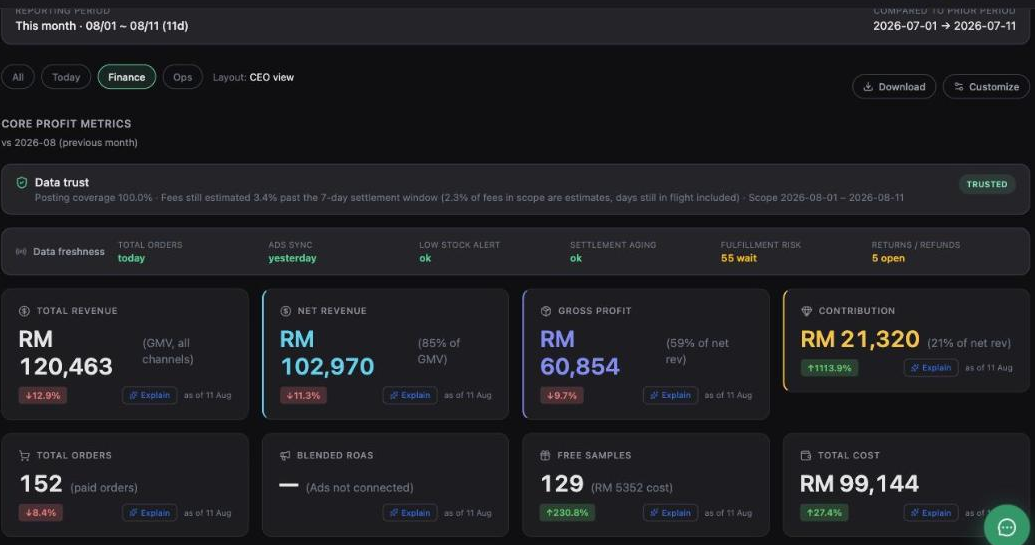
What every tile actually measures, which numbers are settled and which are still estimates, and how to read the Data trust banner.
Tiles · Data trust · Data freshness · Analytics
USING INSELLERRun your live team
Create studios and hosts, define your session slots, roster a week, confirm it, and read the per-slot revenue report.
Hosts · slots · rota · Plan vs Actual
USING INSELLERLive reporting
All seven tabs on the Live screen — Analytics, Profit, Meeting, Content, Attribution — and what each one actually answers.
Session P&L · weekly pack · on-camera credit
USING INSELLERLive & creators
Run live sessions and an affiliate programme: schedule hosts, read session profit, and decide which creators to scale or stop.
Live Arena · Schedule & Hosts · Affiliate ROI
USING INSELLERAffiliate daily upload
TikTok has no open Affiliate API, so three exports cross over by hand each day. Which files, from where, and how to tell it worked.
Sample · Transaction · Affiliate Orders
What each step unlocks
| After you finish | Inseller can show you |
|---|---|
| Step 2 — store | Orders, revenue (GMV), platform fees, settlements, returns, live and affiliate performance. |
| Step 3 — ads | Blended ROAS, ad spend next to the revenue it bought, contribution margin, TACOS. |
| Step 4 — costs | Gross profit and per-order margin that are real numbers instead of a percentage assumption. |
| Step 5 — MCP | "Did I make money today?" answered in Claude or ChatGPT, from your own live data. |
What Inseller looks like when it's done
Was this page helpful?